
Mobile Proxies in Practice: Setup, IP Rotation and How They Work
Set up a 4G/5G mobile proxy, rotate your public IP and verify the connection. Gateway architecture, CGNAT, browser settings and real limits.
On this page
You buy a mobile proxy and receive a host, port, username and password. You enter them in a browser, connect, then click “Change IP.” The proxy address stays the same, but the website may see a different public IP. How does that work?
This guide follows a real 4G/5G proxy connection from setup to IP rotation, explains carrier-grade NAT (CGNAT), and shows how to diagnose common problems. The implementation and available features depend on the provider.
1. What you actually receive
A provider usually gives you an endpoint: the proxy gateway host and port, HTTP or SOCKS5 protocol, and login credentials. Some services authorize the IP you connect from instead. A dashboard, rotation URL, sticky-session settings, or region selection may also be included.
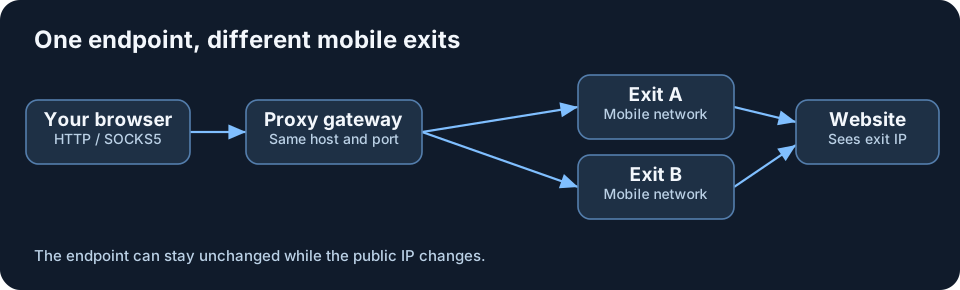
The proxy endpoint is not the public exit IP. Your browser might connect to mobile.example.net:22000 while a website sees 198.51.100.42. After rotation, the website may see 203.0.113.27, with the browser's proxy settings unchanged. All addresses here are documentation examples.
| Field | Example |
|---|---|
| Host | mobile.example.net |
| Port | 22000 |
| Protocol | HTTP / SOCKS5 |
| Username | user123 |
| Password | example-password |
2. Set up a proxy in an anti-detect browser
In many anti-detect browsers, the proxy is assigned per profile. Create a profile, find Proxy/Network settings, choose the supported protocol, enter the host, port, username and password, then run Test Proxy. Save the profile and open a public IP checker inside that profile.
Another profile can use a different exit, while your normal browser or other applications connect directly. A profile proxy is not a system-wide VPN. Browser fingerprint, cookies, WebRTC and other privacy settings need separate attention.
3. Standard browsers, iPhone and Android
Desktop Firefox: Use its Network Settings to configure a manual proxy. For HTTP, check that HTTPS traffic is included. For SOCKS5, check whether remote DNS resolution is available. This need not affect other applications.
Chrome and Edge: Their common desktop setup uses Windows or macOS system proxy settings. Dedicated proxy extensions may offer more control, but support for authentication and SOCKS5 varies.
iPhone: Settings → Wi-Fi → network details → Configure Proxy provides manual HTTP proxy settings for that Wi-Fi network. It does not automatically route cellular data or every app through the proxy.
Android: Many Wi-Fi configurations provide manual HTTP proxy fields. Some applications ignore the system proxy. SOCKS5 or broader app routing may require compatible third-party software, sometimes based on a local VPN interface.
First decide whether you need one browser, one app, or the whole phone to use the proxy. Those are different requirements.
4. What sits between your browser and a website
A simplified route is browser → proxy gateway → mobile connection → mobile carrier → website. The response travels back over the established path.
The gateway accepts your connection and routes traffic through an LTE/5G modem or another available cellular exit. The gateway, modem and operator infrastructure need not be in the same physical place: the provider may use intermediate tunnels and routers.
Your own computer can stay on home Wi-Fi. It does not become a 5G device; the cellular leg is on the provider's exit side.
5. CGNAT: why a public mobile IP may be shared
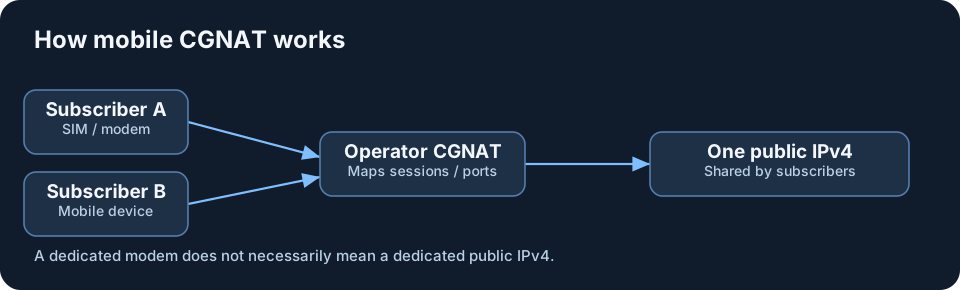
Public IPv4 addresses are scarce. Carriers therefore use CGNAT (Carrier-Grade NAT) so multiple customers can access the internet through the same public IPv4. Internal addresses and translation records, including port mappings, keep sessions distinct.
A phone, mobile router and LTE modem belonging to different users may all appear to a website under one public IPv4. That does not mean they are the same person or device.
Even a dedicated modem with its own SIM does not guarantee an exclusive public IPv4. Dedicated hardware and a dedicated public address are two separate service characteristics. IPv6 may use different addressing arrangements.
6. Dedicated modem or mobile exit pool
Dedicated SIM modem: A particular device or cellular connection is assigned to the customer. Rotation may reconnect that modem to the carrier. It provides a clear relationship to hardware, but a reconnection can still return the same public IP.
Mobile exit pool: You connect to a gateway, which selects from available cellular exits. Rotation may switch to another route without rebooting your browser or reconnecting the same modem.
Hybrid designs also exist. Ask what is actually dedicated: hardware, a public IP, a route or just the account. The label “Mobile 4G/5G” does not answer these questions.
7. Three common IP rotation modes
Manual rotation: Click Change IP in the dashboard or open a provider-supplied URL, such as https://rotate.example.net/change?token=EXAMPLE. The command can trigger a modem reconnection or select a different route. Never expose a real rotation token.
Automatic rotation: A provider might rotate on a timer, upon a new connection, or after a set number of requests. A ten-minute interval does not necessarily move every existing connection at the same instant.
Sticky session: The selected exit is assigned to your session for a period of time. That can make a browsing session more predictable, but it is not a permanent static IP guarantee. Carrier events and service limits can end the assignment early.
8. What happens when you click “Change IP”
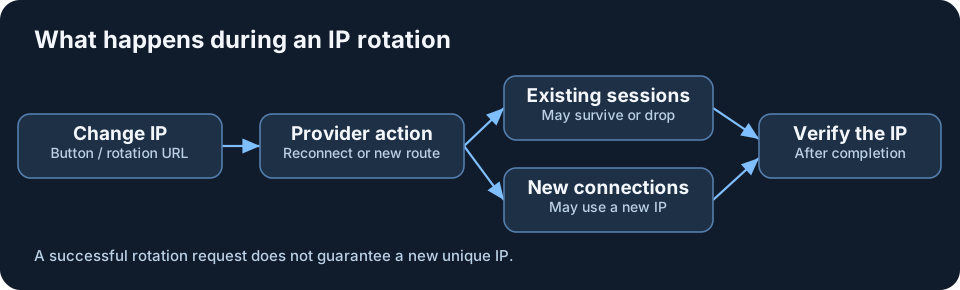
Your browser settings generally stay the same: the gateway, port and login can remain unchanged unless the provider specifies a different endpoint or session identifier. The routing changes behind the gateway.
An open tab can keep displaying an already loaded page. A new request may take the new exit, whereas an established TCP connection may stay on the old path or fail. Downloads, WebSockets and form submissions can be interrupted.
Website login cookies do not disappear simply because the IP changes. The website may nevertheless require reauthentication or an extra security check.
A rotation button may acknowledge a command before it has completed. Wait, then make a fresh IP-check request inside the same proxy-enabled profile. The same public IP may be returned again; a new unique address is not guaranteed.
9. Mobile vs ISP, Datacenter and Residential in practice
The browser setup can look almost identical for all four types. The difference becomes visible after reconnecting, working through a long session, rotating, or sending substantial traffic.
Mobile 4G/5G: The exit is on a cellular network. The IP may remain steady for a session or change after rotation, reconnection or carrier activity. Useful when testing how a service behaves through mobile connectivity, but cellular conditions affect reliability.
ISP / Static Residential: Typically selected for a predictable long-lived address. Close the browser and reconnect tomorrow: if the service is still active, the address should generally be the same. “Static Residential” sometimes means ISP-announced IP space hosted on server infrastructure rather than a physical home line.
Datacenter: Server infrastructure often offers more predictable capacity and concurrency. Some datacenter proxies are static, while others rotate. Websites may classify the exit as hosting or datacenter traffic.
Rotating Residential: A pool of residential or consumer exits. The gateway can select another address per request, on a timer or per sticky session. Availability and stability depend on the pool and provider. Ask how participating connections are sourced and whether owners have consented.
| Type | On reconnect | How the IP changes |
|---|---|---|
| Mobile 4G/5G | May stay or change | Carrier events / rotation |
| ISP / Static | Usually the same | Rotation is not primary |
| Datacenter | Depends on plan | Static or server pool |
| Rotating Residential | Depends on sticky session | Available residential pool |
If you need one stable address for a long-running task, compare ISP and static datacenter options. If you need to test a service specifically on a mobile carrier network, use a genuine cellular exit. If frequent consumer-network rotation is the goal, examine the residential pool's session rules. No category automatically outperforms every other one.
10. Speed, latency, geolocation and limits
Speed depends on signal quality, radio coverage, cell congestion, data plans, hardware, distance and provider infrastructure. A “5G” label does not guarantee a faster experience than good 4G or wired access.
The extra gateway and mobile route can add latency. IP geolocation databases sometimes disagree about the city: one may locate the carrier's infrastructure rather than the modem. A mismatched city alone is not proof of failure.
Carriers can impose CGNAT, data or connection limits, protocol filters and differing IPv4/IPv6 support. Rotation may cause dropouts or return the same public IP. Check the actual service terms before buying.
11. Verify that your proxy is working
Run checks in the same app or browser profile where the proxy is configured. Your ordinary browser can legitimately show a different IP from the proxy-enabled profile.
Public IP: Compare it against a direct connection and test again after rotation. Caches and persistent connections can delay what you observe.
ASN / ISP: The Autonomous System Number helps identify the network announcing the IP. ISP databases provide carrier or organization labels, but neither proves the presence of a specific SIM or modem. Databases can disagree.
DNS: See how domain names are resolved. A different DNS resolver is not necessarily a leak; it depends on the intended configuration. Check remote DNS resolution options for SOCKS5 clients.
WebRTC: Some browser real-time connections behave differently from regular proxied HTTP traffic. A private local address or mDNS hostname is not itself proof that your public address leaked, but your normal public IP appearing unexpectedly deserves investigation.
IPv6: If the proxy handles IPv4 only, certain IPv6 traffic may take a different path. IPv6 itself is not a problem; the actual route matters.
Use Bumaga's Proxy Checker and WebRTC Leak Test. Interpret the findings in the context of your expected routing.
12. The most common beginner mistakes
Confusing gateway and public exit: A fixed host:port can still provide changing outward-facing IPs.
Rotating during an active operation: Downloads, WebSockets and authenticated sessions may fail or require additional checks.
Choosing the wrong protocol: HTTP and SOCKS5 require matching client/server support. HTTPS websites can work over an HTTP proxy via CONNECT.
Assuming system-wide routing: Apps may use their own networking stack or ignore OS proxy settings.
Assuming guaranteed anonymity: A proxy does not erase cookies or browser fingerprints, automatically correct DNS/WebRTC/IPv6 routing, or make the provider itself unable to observe connection metadata. Use HTTPS and trusted providers.
Expecting unique or pristine IPs: Rotation can return an address seen before. CGNAT can share it among users, and every IP's reputation is individual.
13. Questions to ask before you buy
Ask about (1) dedicated modem versus pool, (2) the rotation mechanism, (3) sticky-session duration, (4) whether host, port and credentials stay the same, (5) supported protocols and authentication, and (6) traffic, bandwidth, concurrency, location and IPv6 limits.
The key idea: A mobile proxy provides a managed exit through cellular network infrastructure. The gateway details may remain stable while the public IP changes. What matters is how the connection behaves for your actual use case, not the “4G/5G” label.
Related reading
All articles →
Total Online Anonymity: Privacy Architecture and Device Isolation
Design a practical privacy architecture with device isolation, Qubes OS, Whonix, host VPNs, Tor, browser proxies, leak testing and an honest analysis of VPN - Tor - VPN.
Read →
How Websites Recognize You After an IP Change: Browser Fingerprinting and Anti-Fraud
From IP, TLS/JA4 and Canvas to WebGPU, WebAssembly and anti-fraud. How websites correlate browsing sessions, common myths and ways to test your privacy.
Read →